> ## Documentation Index
> Fetch the complete documentation index at: https://developers.marty.hr/llms.txt
> Use this file to discover all available pages before exploring further.
# Webhooks Overview
Webhooks in Marty allow you to receive real-time notifications whenever specific events occur in your workspace. They enable your systems to react instantly without polling for changes.
You can use webhooks to:
* Trigger internal workflows in your infrastructure
* Send data to third-party services (e.g., Slack, GitHub, Zapier)
* Power real-time integrations inside Marty apps
To start using webhooks, you must configure a public endpoint URL in your Marty Developer Settings where event notifications will be delivered.
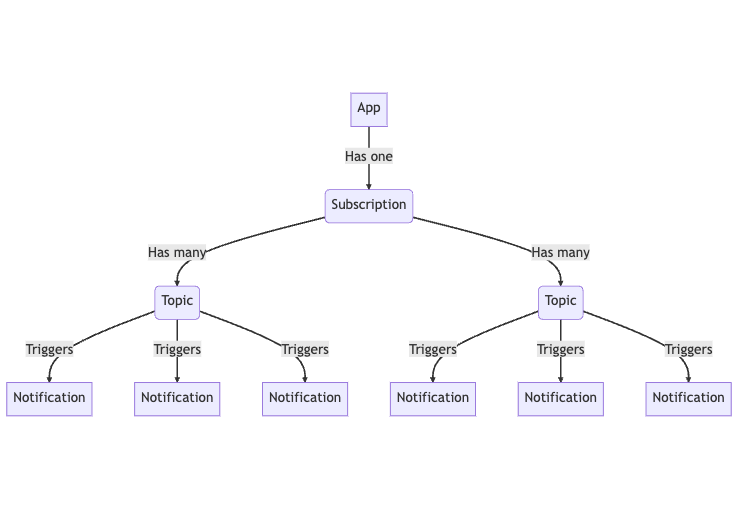
If you haven't worked with Webhooks before, check out this blog post [**from Pipedream**](https://requestbin.com/blog/working-with-webhooks/) to get an overview. If more of a visual person, here's a diagram of the Webhook system:
 ## **Subscriptions**
You can create a webhook **subscription** within your Marty app by choosing the **topics** that you want to be notified about and providing an **destination** where you want the **notifications** to be sent.
A webhook subscription defines:
* Which **event topics** you want to listen to
* The **destination** where Marty should send notifications
Each subscription is tied to a specific workspace.
## **Topics**
A [**topic**](https://developers.marty.hr/webhooks/topics) is the event that happens within Intercom that triggers the webhook. In your subscription you can choose and enable any of the available topics for the version that you are on. When your endpoint is hit you will receive a notification to that endpoint.
## **Notifications**
A [**notification**](https://developers.marty.hr/webhooks/notifications) is the event object delivered when an event is triggered. The notifications contain data payloads that contain references to the Intercom objects associated with the event. Notifications for all topics will be sent to the URL you provided for your subscription.
## **Destinations**
Marty webhooks can be delivered to multiple destination types depending on your integration needs and infrastructure setup. Supported destinations include:
* **Webhook (HTTP Endpoint)** – Direct HTTP callbacks to your server or third-party APIs
* **Hookdeck Event Gateway** – Reliable event delivery layer with retries, observability, and replay capabilities
* **AWS SQS** – Fully managed message queue for scalable asynchronous processing
* **AWS Kinesis** – Real-time streaming and data ingestion pipeline
* **AWS S3** – Event storage for archival, audit, or data lake use cases
* **GCP Pub/Sub** – Google Cloud messaging system for event-driven architectures
* **Azure Service Bus** – Enterprise messaging platform for Azure-based systems
* **RabbitMQ** – Flexible open-source message broker for routing and queueing
* **Apache Kafka** – High-throughput distributed event streaming platform
These destinations allow you to integrate Marty webhooks into virtually any modern event-driven or cloud-based architecture.
## **Webhook Delivery**
When a webhook delivery fails, Marty automatically retries sending the event using a configurable retry strategy.
When an event occurs:
* Marty identifies all active subscriptions that match the event topic
* It sends an message request to each configured endpoint or destination
* Your system is expected to respond with a `2xx` status code to confirm successful receipt
If your endpoint does not respond successfully:
* Marty retries delivery using an exponential backoff strategy
* Persistent failures may result in temporary disabling of the endpoint to protect system stability
Marty retries failed webhook deliveries using an exponential backoff strategy (base 2), where each retry increases the delay to improve reliability and reduce load on the target system. The process starts with a 60-second (1 minute) base interval, and each subsequent retry doubles the previous delay (1 min → 2 min → 4 min → 8 min → 16 min → 32 min → 1 h 4 min → 2 h 8 min → 4 h 16 min).
## **Best Practices**
To ensure reliable webhook processing:
* Always respond quickly (within a few seconds)
* Handle retries safely (webhooks may be delivered more than once)
* Verify payload authenticity if signatures are provided
* Process events asynchronously when possible
## **What's next?**
Now that you've learned the basics of webhooks, you could:
* [**Setup your first webhook**](https://developers.marty.hr/webhooks/webhook-setup)
* [**Learn about the topics you can subscribe to**](https://developers.marty.hr/webhooks/topics)
* [**Learn more about how we deliver notifications**](https://developers.marty.hr/webhooks/notifications)
## **Subscriptions**
You can create a webhook **subscription** within your Marty app by choosing the **topics** that you want to be notified about and providing an **destination** where you want the **notifications** to be sent.
A webhook subscription defines:
* Which **event topics** you want to listen to
* The **destination** where Marty should send notifications
Each subscription is tied to a specific workspace.
## **Topics**
A [**topic**](https://developers.marty.hr/webhooks/topics) is the event that happens within Intercom that triggers the webhook. In your subscription you can choose and enable any of the available topics for the version that you are on. When your endpoint is hit you will receive a notification to that endpoint.
## **Notifications**
A [**notification**](https://developers.marty.hr/webhooks/notifications) is the event object delivered when an event is triggered. The notifications contain data payloads that contain references to the Intercom objects associated with the event. Notifications for all topics will be sent to the URL you provided for your subscription.
## **Destinations**
Marty webhooks can be delivered to multiple destination types depending on your integration needs and infrastructure setup. Supported destinations include:
* **Webhook (HTTP Endpoint)** – Direct HTTP callbacks to your server or third-party APIs
* **Hookdeck Event Gateway** – Reliable event delivery layer with retries, observability, and replay capabilities
* **AWS SQS** – Fully managed message queue for scalable asynchronous processing
* **AWS Kinesis** – Real-time streaming and data ingestion pipeline
* **AWS S3** – Event storage for archival, audit, or data lake use cases
* **GCP Pub/Sub** – Google Cloud messaging system for event-driven architectures
* **Azure Service Bus** – Enterprise messaging platform for Azure-based systems
* **RabbitMQ** – Flexible open-source message broker for routing and queueing
* **Apache Kafka** – High-throughput distributed event streaming platform
These destinations allow you to integrate Marty webhooks into virtually any modern event-driven or cloud-based architecture.
## **Webhook Delivery**
When a webhook delivery fails, Marty automatically retries sending the event using a configurable retry strategy.
When an event occurs:
* Marty identifies all active subscriptions that match the event topic
* It sends an message request to each configured endpoint or destination
* Your system is expected to respond with a `2xx` status code to confirm successful receipt
If your endpoint does not respond successfully:
* Marty retries delivery using an exponential backoff strategy
* Persistent failures may result in temporary disabling of the endpoint to protect system stability
Marty retries failed webhook deliveries using an exponential backoff strategy (base 2), where each retry increases the delay to improve reliability and reduce load on the target system. The process starts with a 60-second (1 minute) base interval, and each subsequent retry doubles the previous delay (1 min → 2 min → 4 min → 8 min → 16 min → 32 min → 1 h 4 min → 2 h 8 min → 4 h 16 min).
## **Best Practices**
To ensure reliable webhook processing:
* Always respond quickly (within a few seconds)
* Handle retries safely (webhooks may be delivered more than once)
* Verify payload authenticity if signatures are provided
* Process events asynchronously when possible
## **What's next?**
Now that you've learned the basics of webhooks, you could:
* [**Setup your first webhook**](https://developers.marty.hr/webhooks/webhook-setup)
* [**Learn about the topics you can subscribe to**](https://developers.marty.hr/webhooks/topics)
* [**Learn more about how we deliver notifications**](https://developers.marty.hr/webhooks/notifications)